Shared inbox
The inbox for the chats your assistant can't finish
Counter answers what your rules allow. Everything else lands here with the reason, the customer and the order already attached, so your team can reply, approve or take over without digging.
7-day free trial. Unlimited team seats on every plan.
Triage
Know why every chat is waiting on you.
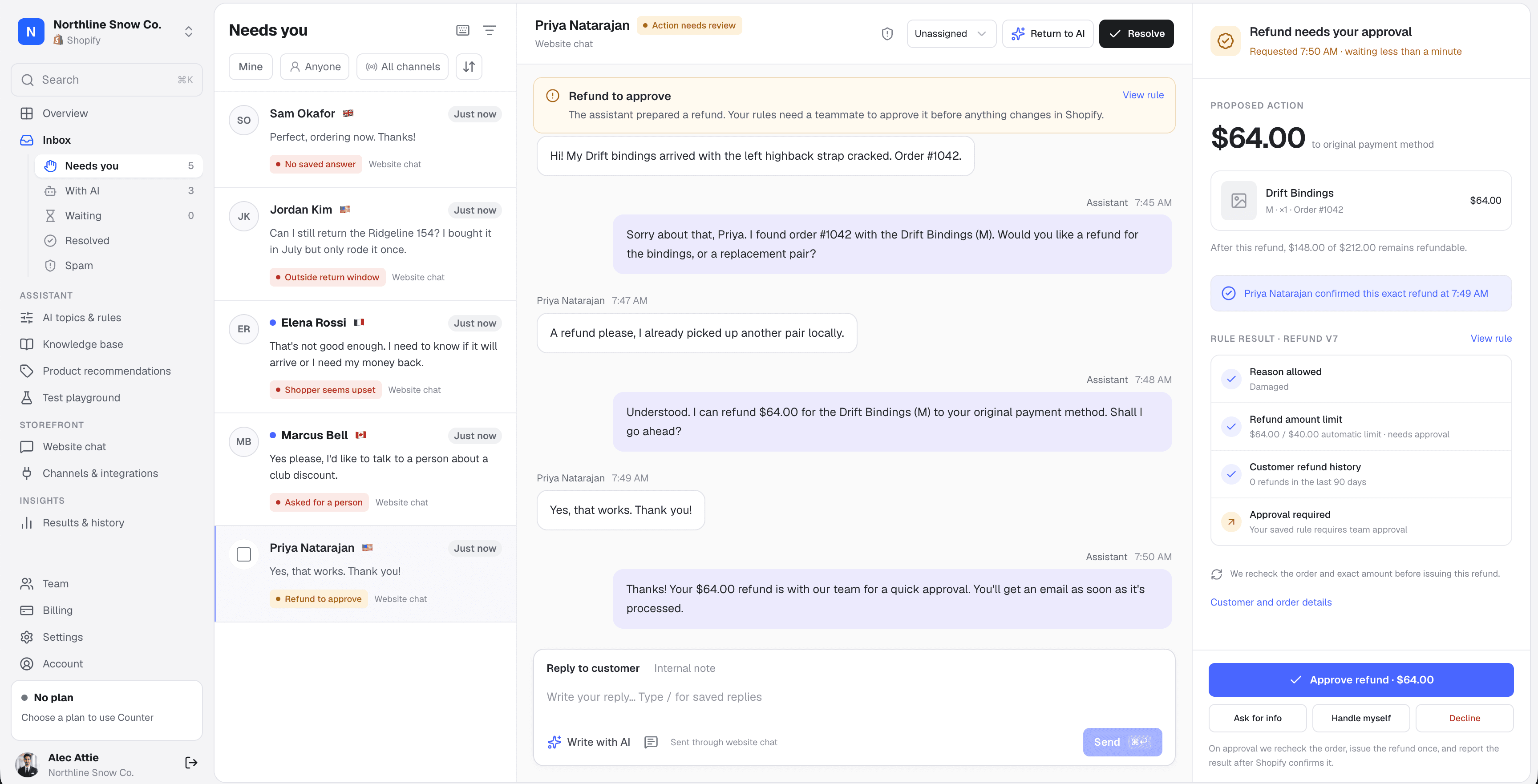
Conversations sort themselves into Needs you, With AI, Resolved and Spam. Needs you puts the longest wait first, and every chat says in plain words why the assistant stopped.
- About 30 handoff reasons, from “Asked for a person” to “Outside return window”, each linked to the rule that triggered it
- A wait-time chip that turns warm after 15 minutes and late after an hour
- Unread dots tracked per teammate, so one person opening a chat doesn't hide it from the rest
- Live updates every few seconds and a Needs you count in the sidebar
- Elena Rossi1h
I need to know if it will arrive or I need my money back.
Shopper seems upset - Jordan Kim22m
Can I still return the Ridgeline 154? I only rode it once.
Outside return window - Priya Natarajan4m
Yes, that works. Thank you!
Refund to approve - Sam Okafor1m
Do the bindings fit a 2019 board?
No saved answer
Outside return window
Delivered 41 days ago. Your returns rule allows 30 days.
Write with AI
Draft and rewrite replies without leaving the chat.
With an empty composer, Write with AI drafts a reply from the conversation, the handoff reason, your knowledge base and your store's tone. With text already there, it rewrites it. Nothing is sent until you press Send.
- Quick starts: reply to their last message, apologize, ask for the order number, thank them, or your own instruction
- Rewrite as more formal, friendlier, shorter, or fix the grammar and keep your wording
- Drafts never say a refund or change happened unless you told it so
- Replies stay in the language the shopper wrote in, and Undo brings back your own text
So sorry for the wait, Elena. Your parcel has been stuck at the UPS depot since Tuesday. I've asked them to trace it and I'll update you here by tomorrow.
Sending a reply pauses the assistant for this chat
Saved replies
Your best answers, one slash away.
Type / in the composer to search your team's saved replies by name or text, then press Enter to insert one. {first_name} fills in the shopper's name.
- Up to 100 shared replies for the whole team
- Owners and admins edit the library, and every agent can use it
- Arrow keys to choose, Enter or Tab to insert, Esc to close
Saved replies
Return label sent
Hi {first_name}, your prepaid return label is attached…
Return window
Hi {first_name}, returns are open for 30 days from delivery…
Exchange instead of return
Hi {first_name}, happy to swap it for another size…
/ret
Customer & order context
The order is already open next to the chat.
Counter links the order the shopper verified, or the order number they typed, and shows it beside the conversation. You can also look one up yourself. A lookup by your team never counts as the shopper's verification.
- Customer card with a Verified badge, order count, lifetime spend and customer since
- Line items, payment and fulfillment status, and a timeline with tracking links
- One click to open the order in Shopify or Medusa
- A Sources tab listing the knowledge the assistant quoted
Priya Natarajan
priya.n@example.com · United States
- 3
- Orders
- $412.00
- Lifetime spend
- Mar 2025
- Customer since
Order #1042
Open in Shopify- Delivered · Sep 28UPS tracking
- Shipped · Sep 24
Approvals
Growth+Approve the exact refund, not a guess at one.
When a rule says a teammate must sign off, the assistant prepares the exact request and your team decides. You see the amount, the items and every rule result in one panel.
- Refunds, returns, exchanges, store credit, cancellations, address changes and discount codes
- Required checks to tick before approving, such as items received or damage photo reviewed
- For refunds and returns, Approve stays locked until the shopper has confirmed the quote
- Counter rereads the live order before running it once, then reports what Shopify or Medusa returned
- Decline, handle it yourself, or ask the shopper for more information
Proposed action
$64.00to original payment method
Priya confirmed this exact refund at 7:49 AM
Rule result · Refunds v7
- Reason allowedDamaged
- Refund amount limit$64.00 / $40.00 automatic limit · needs approval
- Customer refund history0 refunds in the last 90 days
Spam protection
Spam is filtered before the assistant reads it.
Link floods, SEO and crypto pitches, and bursts of new chats from one address go straight to the Spam queue. They never reach the assistant, and your team isn't emailed about them.
- Catches promotional pitches in English, Spanish, French and German
- Limits new chats per IP address each hour, adjustable or off
- Marking a chat as spam blocks that address, and Not spam lifts the block
- Each spam chat shows why it was flagged
Visitor · 185.220.x.x
Boost your store to page 1 on Google!! seo-rank…
Promotional linksVisitor · 185.220.x.x
Hello
Many chats from one IPVisitor · 45.12.x.x
Crypto partnership for your brand, WhatsApp me
Flagged by the assistant
Everything else
Built for a team working the same queue.
Take over and hand back
Taking over pauses the assistant on that chat. Return to AI when you're done, and a new message on a resolved chat reopens it.
Internal notes
Leave context for teammates in the thread. Notes are never shown to the shopper or sent to the assistant.
Assignment and roles
Assign chats to anyone on the team. Owners, admins and support agents each get the right access, with unlimited seats.
The shopper sees who's replying
After a handoff, the chat shows “Maya will reply here” with your teammate's photo.
Search and filters
Search names, emails, order numbers and every message and note. Filter by assignee or channel.
Bulk actions
Select up to 100 chats to assign to yourself, return to the assistant or resolve at once.
Keyboard shortcuts
Move between chats with the arrow keys, reply, add a note, resolve and open the next without touching the mouse.
Photos, PDFs and voice notes
Shoppers can attach files and voice messages. A damage photo the assistant asked for is saved as evidence.
Private files, logged access
Attachments are only served to signed-in teammates, and every view of a chat, order or file is logged.
Email alerts
Get an email for handoffs and approvals, with a link to the chat. Each teammate chooses which alerts to mute.
Unread per teammate
Each person sees what's new since they last opened a chat, regardless of who else has looked.
Activity in plain words
Assignments, takeovers, approvals and resolutions are written into the thread, so you know who did what.
FAQ
The inbox, answered.
Do I need someone watching the inbox all day?
- No. The assistant handles everything your rules allow, and Needs you only fills when a person is required. Handoffs and approvals also arrive by email, with a link straight to the conversation.
What happens to the assistant when I reply?
- Replying or taking over pauses the assistant on that conversation, so it never talks over you. Choose Return to AI to hand the chat back.
Who can approve refunds, returns and other changes?
- Owners and admins. Support agents can reply, take over, leave notes, use saved replies and resolve conversations.
Does the AI write replies for my team?
- Only when you ask. Write with AI drafts a reply from the conversation and your knowledge base, and Rewrite changes the tone or length of what you wrote. You review every draft before sending.
Does the assistant see internal notes?
- No. Notes are for your team only. They're never shown to the shopper and never included in what the assistant reads.
Is there a limit on team members?
- No. Every plan includes unlimited team seats. You pay for AI conversations, not people.
More questions are answered on the main FAQ.
Let Counter take the first reply.
Connect your store, publish your rules and test everything in the playground before a single shopper sees it. Every plan starts with a 7-day free trial.