Channels & integrations
A chat that installs in minutes and looks like your store
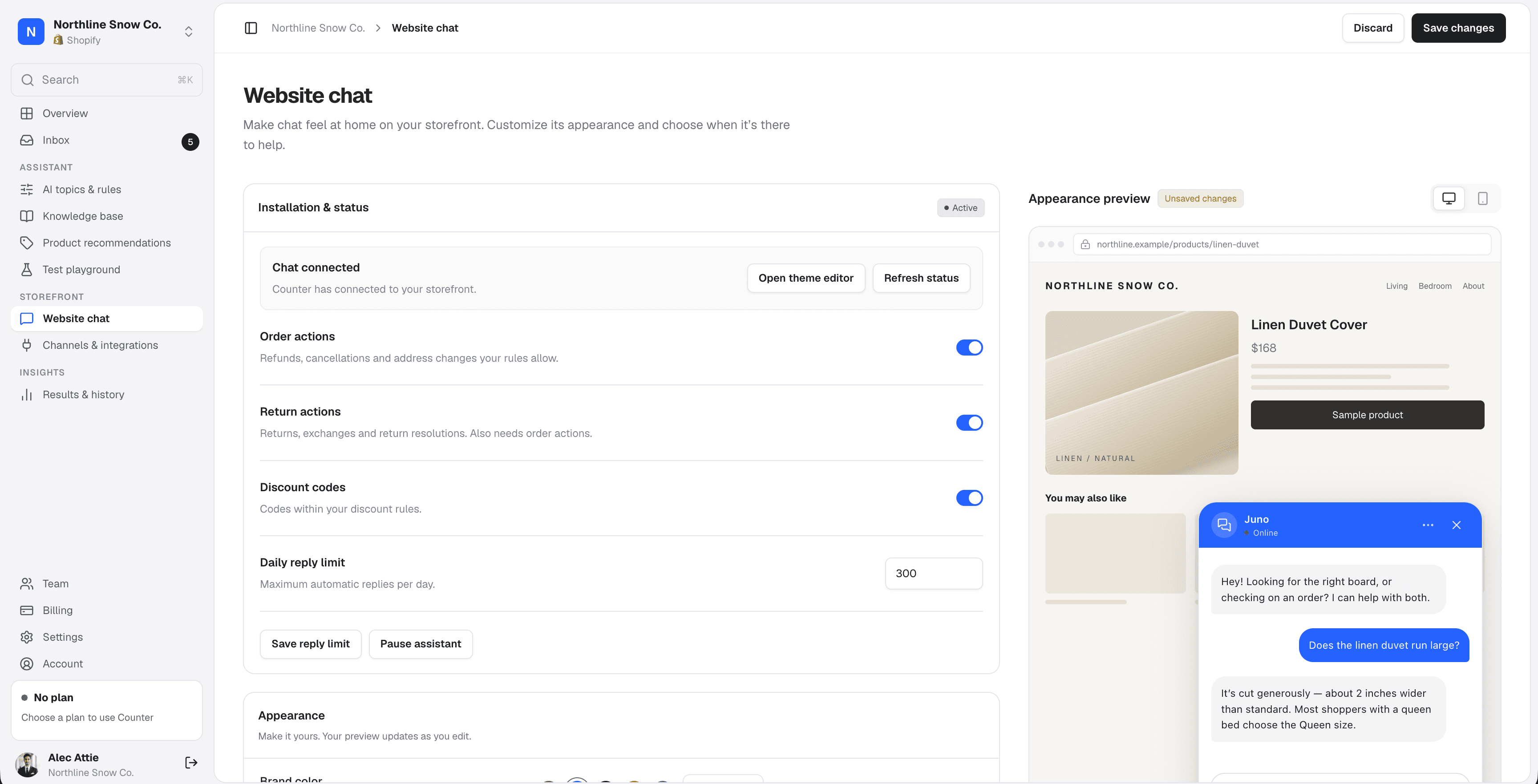
Add Counter's website chat to Shopify from the theme editor, or to Medusa and headless storefronts with one script tag. Match it to your brand, choose where it appears, and preview it before it goes live.
7-day free trial. Unlimited team seats on every plan.
Install
On your storefront without a developer.
On a Shopify theme, turn on the Counter app embed in the theme editor. On Medusa, Hydrogen or a custom Next.js storefront, paste one script tag. The console shows “Installed” once the chat checks in from your store.
- Shopify themes: one toggle under App embeds, no code to paste
- Medusa: one script tag before the closing body tag
- Headless Shopify, like Hydrogen or Next.js: a snippet tied to your storefront's address
- Script snippets only start the chat on the storefront address you saved
 Theme editorApp embeds
 Medusa or headless storefront
<script src="https://usecounter.ai/api/widget/script" data-counter-key="cw_••••••••" defer></script>
Installed · northlinesnow.com
Customize
Your colors, your logo, your greeting.
Set the brand color, logo, assistant name and first message. The preview updates as you edit, on desktop and mobile, before any shopper sees it.
- Brand color for the header, launcher and shopper messages, with text that stays readable on light colors
- Upload a PNG, JPEG or WebP logo
- Launcher on the bottom right or bottom left
- No “Powered by Counter” footer on paid plans
- Brand color
- Launcher
- Bottom leftBottom right
- Assistant name
- Juno
- Greeting
- Hi! Ask me about sizing, shipping or your order.
Where it appears
On the pages where it helps, nowhere else.
Show the chat on every page or only on the paths you list, and hide it where it gets in the way. Checkout is always excluded.
- Show on all pages or specific paths, with * as a wildcard
- Hide on paths takes priority over Show on
- A proactive nudge shows your greeting after 20 seconds on a product page, once per visit
- “Talk to the team” appears only while your team is online
- Open the chat from your own button or link
- Show onCheckout is always excluded
- /products/*/collections/*/pages/faq
- Hide onTakes priority over Show on
- /products/gift-card
- Proactive nudgeAfter 20 seconds on a product page
In the chat
Everything shoppers need, in one window.
Verify an order
Shoppers confirm a code sent to their order email before Counter shares any order detail.
Talk to the team
A shortcut to a person while your team is online. After a handoff, the shopper sees which teammate will reply.
Photos and files
Attach up to three images or PDFs, under 4 MB in total, such as a photo of a damaged item.
Voice notes
Shoppers can record a voice message instead of typing. It goes to your team to listen to.
In your store's language
The chat's buttons and fixed messages come in English, Spanish, French and German.
Emoji
A built-in emoji picker, because some questions are easier with one.
Expand window
Shoppers can widen the chat for long answers or several product cards.
Open from anywhere
Open the chat from a “Help” link or button on any page with one line of JavaScript.
Product cards and quotes
Recommendations, return items and discount offers appear as cards the shopper can act on.
Platforms
Connects to the store you already run.
Products, orders and policies are read live from your store, so there's nothing to sync.
- Shopify
- Authorize Counter on your store in one click
- Chat goes live with the Counter app embed in your theme editor
- Headless storefronts use the script snippet instead
- Billed on your Shopify invoice
- Medusa
- Connect Medusa v2 with a publishable key, plus a secret key for order actions
- Chat goes live with one script tag on your storefront
- Your storefront passes the cart to Counter for discount codes
- Billed through Stripe
Coming soon
More places to reach your shoppers.
These aren't available yet. Merchants can already ask for them from Channels & integrations in the console, and that's how we decide what to build next.
- Not available yet
WhatsApp Business
Order updates and returns through WhatsApp Business.
- Not available yet
Messenger
Reply to shoppers on your Facebook page.
- Not available yet
Instagram DMs
Answer product questions from DMs and story replies.
- Not available yet
Helpdesk, alerts and fulfillment
Connect the tools your team already uses for handoffs, alerts and shipping.
Missing a tool?
Tell us which channel or app you'd connect first. Write to support@usecounter.ai.
FAQ
Channels and integrations, answered.
Do I need a developer to install the chat?
- Not on a Shopify theme: turn on the Counter app embed in the theme editor. Medusa and headless storefronts need one script tag added to the page, which most site builders and frameworks let you paste in.
Will the chat slow down my store?
- The script loads with defer, so it doesn't block your page from rendering, and the chat runs in its own isolated container so it doesn't clash with your theme's styles.
Can I hide the chat on some pages?
- Yes. Show it on every page or only on paths you list, and hide it on any path. Hide on always wins, and checkout is always excluded.
Does Counter work with headless Shopify?
- Yes. Create a snippet for your storefront's address under Website chat and add it to your Hydrogen or Next.js layout. Discount requests from a headless storefront go to your team, because the chat can't read the cart there.
Is there an email, WhatsApp or Instagram channel?
- Not yet. Website chat is the live channel today. You can ask for the channels you want from Channels & integrations in the console.
Can I remove the “Powered by Counter” footer?
- Yes. It's hidden on every paid plan.
Keep reading
More questions are answered on the main FAQ.
Let Counter take the first reply.
Connect your store, publish your rules and test everything in the playground before a single shopper sees it. Every plan starts with a 7-day free trial.